
Mobile Casino Tips: Browser vs App, Data, Security and Limits
Most online casino play now happens on phones. Modern casino games are built in HTML5, so the same pokie or table game runs in a phone browser with the same rules and RTP as on desktop. What changes on mobile is the way you access the casino, how you secure it, how much data and battery it uses, and how easy it is to play more often than intended. This page covers each point; it is part of our casino tips and strategy section.
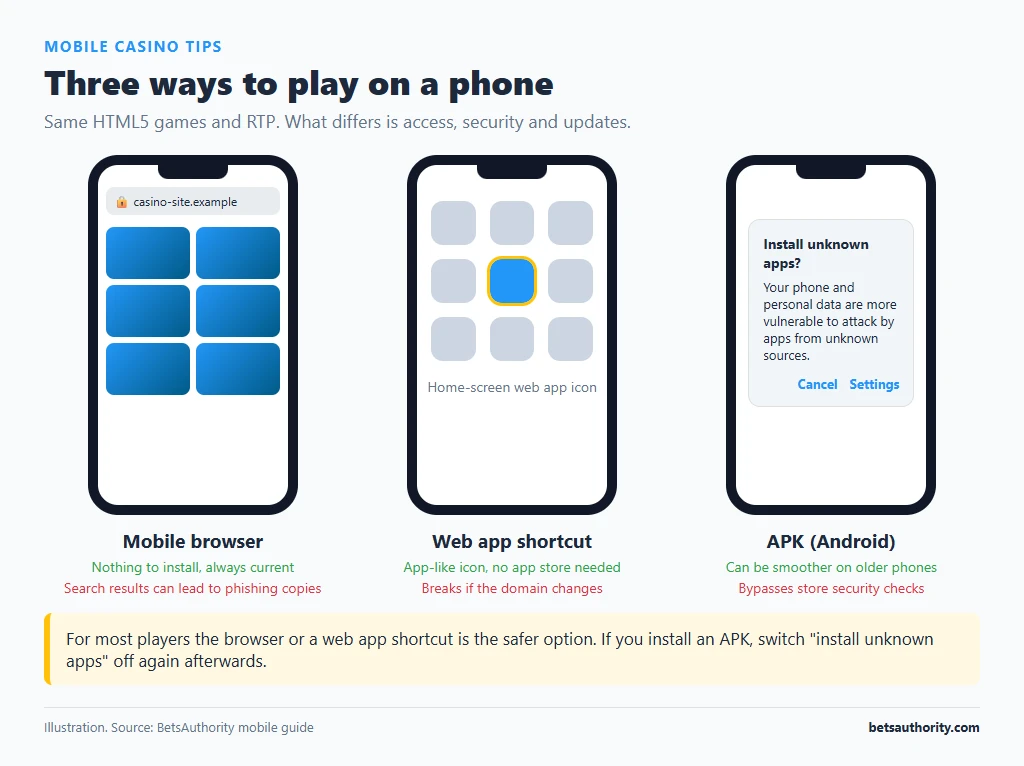
Three Ways to Play on a Phone
| Method | How you get it | Pros | Cons |
|---|---|---|---|
| Mobile browser | Open the casino site in Safari or Chrome | Nothing to install; always the current version | Easy to land on a phishing copy if you search instead of using a bookmark |
| Web app (PWA / home screen shortcut) | “Add to Home Screen” from the browser, or an install prompt on the site | App-like icon and full-screen view; no app store needed | Still depends on the domain; if it changes, the shortcut breaks |
| Native app or APK | App store, or a file downloaded from the casino site (Android) | Can be smoother on older phones | Offshore real-money casino apps are generally not in the Australian App Store or Google Play; APKs from websites bypass store security checks |
For most players the browser or a web app shortcut is the safer option. If you do install an APK, download it only from the casino’s verified domain and switch “install unknown apps” off again afterwards. Our guides to playing on mobile and installing a casino app give step-by-step instructions.
What Is Different About Games on Mobile
- Same maths. RTP, volatility and features are the same as desktop for HTML5 games from major studios. Check the RTP in the game info screen as usual; see payout percentage.
- Portrait vs landscape. Many newer pokies have a portrait layout; older titles may force landscape. Live tables usually work in both.
- Smaller buttons. Bet size controls are close together, which makes accidental higher stakes more likely. Check the stake before each session and after any lag.
- Game library. Occasionally an older title is not available on mobile. Live dealer and current pokies almost always are.
Data and Battery
Pokies load most of their graphics once and then use little data per spin. Live dealer games stream continuous video, which uses far more data per hour; the exact amount depends on the stream quality setting. Practical steps:
- Play live dealer games on Wi-Fi, or lower the video quality in the table settings.
- Check your phone’s data usage screen after the first session to see real consumption.
- A dropped connection mid-round is resolved by the server: the round completes and the result is shown in game history when you reconnect. Check the history before assuming a bet was lost.
- Live streams and 3D pokies drain the battery quickly; low-power mode can reduce frame rate and cause lag.
Mobile Security Settings
- Lock the phone with a PIN or biometrics, especially if others in the house use it.
- Do not let the browser save your casino password on a shared device. Use a password manager instead.
- Turn on two-factor authentication if the casino offers it; an authenticator app on the same phone is still much better than none.
- Keep the operating system updated; casino sites hold payment and ID data.
- Be careful on public Wi-Fi; avoid entering passwords or uploading documents on untrusted networks.
More on this in account security.
Payments on a Phone
Mobile makes deposits fast: PayID, Apple Pay and Google Pay, where available, take a few taps. That convenience is also the risk. Set deposit limits in the casino account, and consider turning off saved payment details. Crypto deposits on mobile involve copying long addresses between apps; check the first and last characters after pasting. See Apple Pay at casinos and PayID for method-specific notes.
Phone Features That Help You Keep Limits
The phone is always with you, so sessions can start in a queue or late at night. Built-in tools help:
| Tool | Where to find it | Use |
|---|---|---|
| Screen Time (iPhone) | Settings, Screen Time, App Limits / Content and Privacy | Daily time limit for the browser or casino web app |
| Digital Wellbeing (Android) | Settings, Digital Wellbeing and parental controls | App timers and bedtime mode |
| Focus / Do Not Disturb | Control centre or quick settings | Blocks casino promo notifications at set times |
| Casino reality checks | Casino account settings | Pop-up showing time played and net result |
| Blocking apps | Third-party gambling blockers | Blocks gambling sites entirely; see blocking software |
Turn off casino push notifications and promotional SMS. They are designed to start sessions you had not planned. Our time management guide covers session planning in more detail.
Choosing a Casino for Mobile Play
Test before depositing: open the site on your phone, load two or three games you would actually play, try the cashier and the live chat. Check that the account settings (limits, KYC upload, withdrawal) all work on mobile; some sites still push document uploads to desktop. Our mobile casinos comparison lists reviewed sites and how they handle mobile access.
Frequently Asked Questions
For HTML5 games from major studios, yes: the same rules, RTP and features. Layout and button placement differ.
No. Most casinos work in the mobile browser, and many let you add a web app shortcut to the home screen.
It carries more risk than browser play because it bypasses app store checks. If you do, download only from the casino’s verified domain and disable unknown sources afterwards.
Considerably more than pokies, because it streams continuous video. The amount depends on the quality setting; use Wi-Fi or lower the quality.
The result is determined on the server. The round completes and appears in your game history when you reconnect.
Phones make gambling available at any hour, so set time limits in advance. 18+; Gambling Help Online: 1800 858 858.