
Apple Pay Casino Payments in Australia
Apple Pay lets you fund a casino account with a card stored in Apple Wallet, confirmed with Face ID, Touch ID or your passcode. It is a deposit method only at the casinos we review: 17 list Apple Pay for deposits and none lists it for withdrawals. Because Apple Pay charges the card behind it, your bank’s gambling rules still apply. This page explains how an Apple Pay casino deposit works, its limits and how you get winnings back.
Casinos That Accept Apple Pay
The casinos below list Apple Pay in their deposit terms. Withdrawals go by another method (bank transfer, card, e-wallet or crypto), so check what each casino offers for cashouts before you deposit.


How Apple Pay Works at a Casino
Apple Pay is not a wallet that holds money. When you add a Visa or Mastercard to Apple Wallet, the card network issues a device-specific token (a Device Account Number) that stands in for the real card number. At checkout, the casino’s payment processor receives the token and a one-time cryptogram, and the payment is charged to your card as a normal card transaction.
Three consequences follow:
- The casino never sees your card number, which reduces exposure if its systems are breached.
- The payment is still coded as gambling (merchant category 7995), so a bank gambling block on the card declines it just as it would a direct card payment.
- Card fees still apply: an international transaction fee if the processor is overseas, and cash-advance charges if the card is a credit card that the issuer treats that way.
Apple Pay Deposit, Step by Step
- Add a debit card in your own name to Apple Wallet. Credit cards attract cash-advance fees at many banks and are often declined for gambling.
- Open the casino cashier in Safari or the casino’s web app on an iPhone, iPad or Mac. The Apple Pay button usually appears only in Safari on Apple devices.
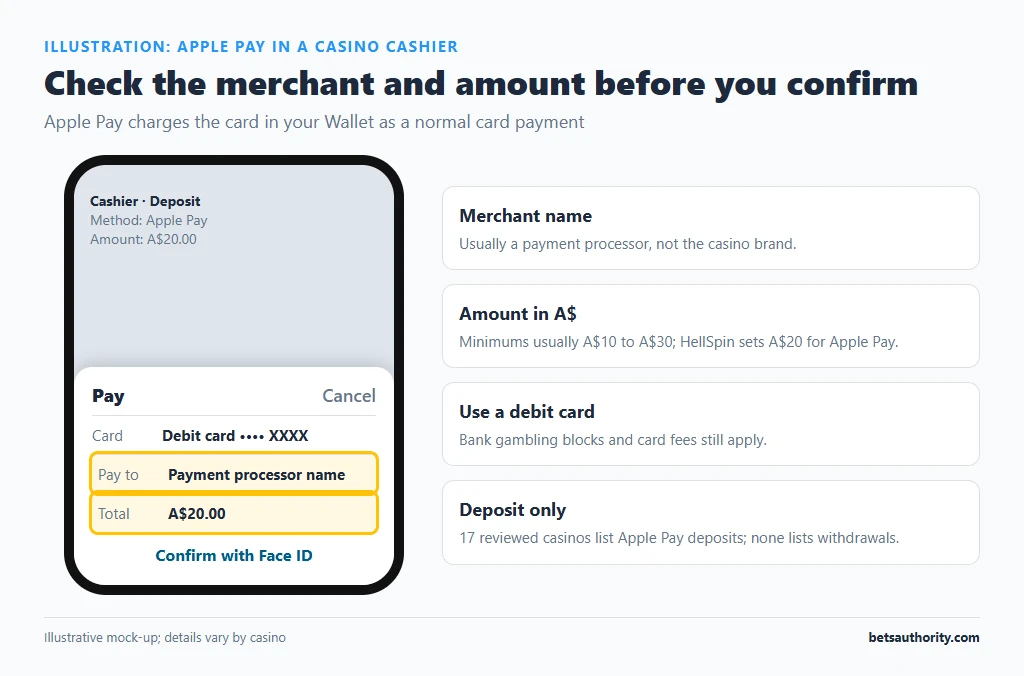
- Select Apple Pay and enter the amount. HellSpin sets a A$20 minimum for Apple Pay; most casinos sit between A$10 and A$30.
- Check the merchant name on the Apple Pay sheet. It is usually a payment processor.
- Confirm with Face ID, Touch ID or your passcode. The balance normally updates within seconds.
Apple Pay at a Glance
| Item | Detail |
|---|---|
| Casinos listing it (our reviews) | 17 for deposits, 0 for withdrawals |
| Deposit speed | Instant once approved |
| Typical minimum | A$10 to A$30 |
| Apple fee to the user | None |
| Bank fees | Same as the underlying card |
| Devices | iPhone, iPad, Apple Watch, Mac (Safari) |
| Gambling block | Applies through the underlying card |
Getting Winnings Out After an Apple Pay Deposit
No casino in our data pays out through Apple Pay. Casinos commonly apply a “closed loop” rule: money goes back to the method you deposited with where possible, otherwise to a verified alternative. With Apple Pay that alternative is usually one of these:
| Payout method | Typical time after approval | Notes |
|---|---|---|
| Card (same card as in Wallet) | 0 to 5 business days | Only where the casino supports card payouts |
| Bank transfer | 1 to 7 business days | Higher minimums common (A$100 at HellSpin) |
| Skrill / Neteller / MiFinity | Within 24 hours at many casinos | Requires a verified e-wallet in your name |
| Crypto | Minutes to 48 hours | Needs a crypto wallet |
Ask support which payout route applies before your first deposit, and complete identity verification early. Casinos may ask for a statement showing the Apple Pay transaction and the last four digits of the underlying card.
What Apple Pay Can’t Do for Australian Players
- Hold a balance. Apple Cash, the stored-value balance used for person-to-person payments, is offered only in the United States. Australian Apple Pay is purely a way to pay with a card.
- Receive refunds as a separate wallet. If a casino refunds a deposit, the money returns to the underlying card, usually within the card issuer’s refund timeframe.
- Act as a spending limit. Apple Pay has no gambling-specific limits. Use the casino’s deposit limits or your bank’s block instead; see how to set deposit limits.
Checklist Before Your First Apple Pay Deposit
- Confirm the casino lists a withdrawal method you can use, and its minimum withdrawal.
- Check whether the welcome bonus terms exclude any deposit methods.
- Use the debit card you can later prove you own with a statement.
- Set the account currency to AUD if available, to avoid conversion margins.
Common Problems
- No Apple Pay button: you’re in Chrome or another browser, or the casino shows Apple Pay only for certain countries or currencies.
- “Payment not completed”: usually a bank decline (gambling block, credit rule or fraud check). Check your banking app.
- Deposit charged but not credited: send support the Apple Wallet transaction details and the bank statement line.
- Bonus excluded: some casinos exclude certain methods from promotions; read the bonus terms before depositing.
Apple Pay vs Google Pay and Cards
Google Pay works the same way on Android and Chrome and is listed by 13 of our reviewed casinos. Paying with the physical Visa or Mastercard gives the same bank treatment but exposes the card number to the processor. The advantage of Apple Pay is security and speed of checkout, not cost or approval rates. Casinos accepting Apple Pay are compared in our Apple Pay casinos list, and every method is summarised on the payments hub. Mobile-specific setup is covered in playing on mobile.
Frequently Asked Questions
Not at the casinos we review. None lists Apple Pay for withdrawals, so payouts go to a card, bank account, e-wallet or crypto wallet in your name.
No. Apple Pay charges the card stored in Apple Wallet, and the transaction is still coded as gambling, so a block on that card declines it.
Apple doesn’t charge users. Your bank’s card fees still apply, such as an international transaction fee (typically around 3%) and cash-advance charges on credit cards.
Apple Pay usually only appears in Safari on an Apple device with a card in Apple Wallet. Some casinos also show it only for certain countries or currencies.
It exposes less information: the casino’s processor receives a device token and one-time code instead of your card number. It doesn’t protect you from losses or from a casino refusing to pay.
Gambling is for adults 18+. For free, confidential support, call Gambling Help Online on 1800 858 858.