
Google Pay Casino Payments in Australia
Google Pay is the checkout button that charges a card saved in Google Wallet. On Android phones and in Chrome it lets you deposit at a casino without typing card details. Of the casinos we review, 13 list Google Pay for deposits and one, CristalPoker, also lists it for withdrawals. Like Apple Pay, it passes the payment to your Visa or Mastercard, so the card’s bank rules and fees apply. This page covers how it works, what it costs and how you get paid out.
Casinos That Accept Google Pay
The casinos below list Google Pay in their deposit terms. Only CristalPoker lists a Google Pay withdrawal option; the others pay out by bank transfer, card, e-wallet or crypto.


Google Pay vs Google Wallet
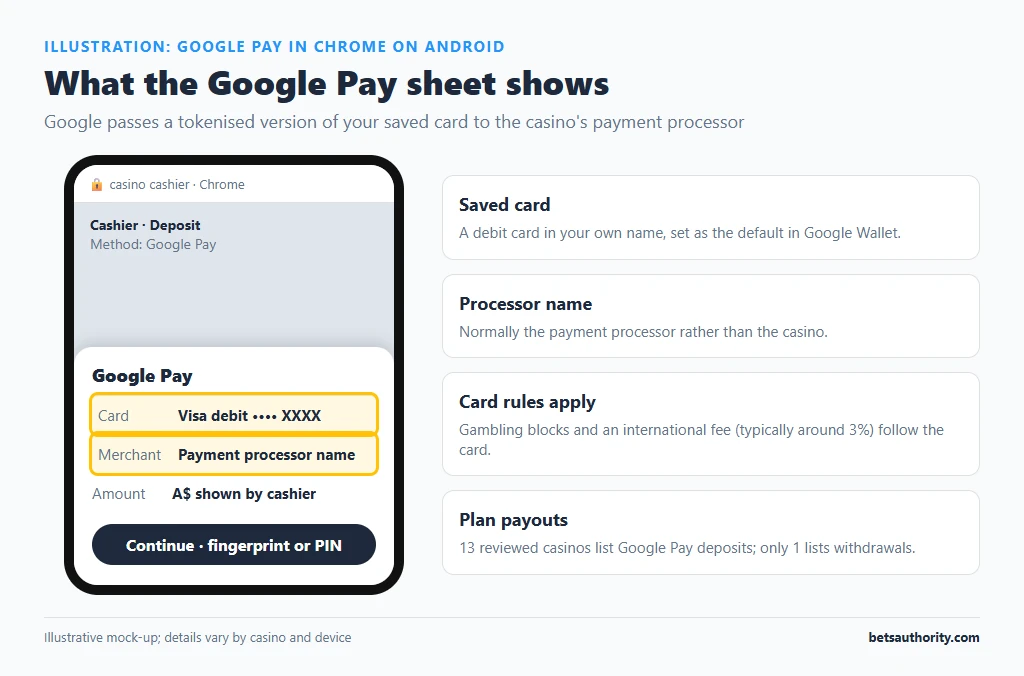
In Australia the app on your phone is Google Wallet, where cards are stored. Google Pay is the payment method that websites and apps show at checkout. When you tap the Google Pay button in a casino cashier, Google passes a tokenised version of your saved card to the casino’s payment processor. The processor charges the card, and the casino credits your balance.
Google doesn’t charge users for this. Everything else follows the card: approval, gambling blocks, international transaction fees and, on credit cards, possible cash-advance treatment.
How to Deposit with Google Pay
- Add a debit card in your own name to Google Wallet and set it as the default for online payments.
- Open the casino cashier in Chrome on Android or desktop, signed in to the same Google account.
- Choose Google Pay, enter the amount and check the minimum (typically A$10 to A$30).
- Select the card in the Google Pay sheet and confirm with fingerprint, PIN or a bank verification step.
- Note the merchant name shown; it is normally the payment processor rather than the casino.
Google Pay at a Glance
| Item | Detail |
|---|---|
| Casinos listing it (our reviews) | 13 for deposits; 1 for withdrawals (CristalPoker) |
| Deposit speed | Instant once approved |
| Google fee | None to the user |
| Bank fees | Those of the underlying card (international fee typically around 3%) |
| Devices | Android phones and watches; Chrome on any desktop |
| Gambling block | Applies via the card’s issuer |
| Chargeback | Through the card issuer, for unauthorised transactions |
Declines and Bank Rules
A Google Pay casino deposit is coded as gambling (merchant category 7995), exactly as a direct card payment is. If you have switched on a gambling block with NAB, Westpac, CommBank or ANZ, the payment will be declined. ANZ also declines gambling on credit cards when the balance is at or would exceed 85% of the limit. Since 11 June 2024, Australian-licensed wagering providers can’t accept credit cards at all; offshore casinos aren’t part of that licensing system, but your bank may still refuse the transaction. For background, see how offshore casinos operate.
Common Problems and Fixes
| Problem | Likely cause | Fix |
|---|---|---|
| No Google Pay button | Browser not signed in to Google, no card in Wallet, or casino hides it for your region or currency | Sign in to Chrome, add a card, or use another method |
| Payment declined | Gambling block, credit-card rule or fraud hold | Check the banking app; don’t retry repeatedly |
| Charged but not credited | Processor delay or failed callback | Send support the Wallet transaction and statement line |
| Unexpected extra charge | International transaction or cash-advance fee | Use a debit card and an AUD balance |
Security and Spending Control
Google Pay sends a token and a one-time code instead of the card number, so a casino or processor data breach exposes less. That is its main advantage over typing card details. It offers no gambling-specific limits, and one-tap checkout makes repeat deposits faster. Pair it with the casino’s deposit limits (see setting deposit limits) or a bank gambling block if you want a hard cap. Lock the phone with a PIN or biometrics so nobody else can approve payments.
Withdrawals After a Google Pay Deposit
Because almost no casino pays out through Google Pay, plan the withdrawal route before you deposit:
| Route | Typical time after approval | Example from our data |
|---|---|---|
| Card payout to the same card | 0 to 5 business days | Wild Tornado quotes 0 to 24 hours for cards |
| Bank transfer | 1 to 7 business days | Golden Crown: up to 3 business days |
| E-wallet (Skrill, Neteller, MiFinity) | Hours to 24 hours | Slots Gallery: usually within 24 hours |
| Crypto | Minutes to 48 hours | Bizzo: instant to 24 hours |
Verify your account before the first withdrawal; the KYC guide lists the documents. Casino-side caps are covered under withdrawal limits.
Google Pay Compared With Other Methods
| Method | Casinos (deposit) | Withdrawals | Main difference |
|---|---|---|---|
| Google Pay | 13 | 1 | Tokenised card on Android/Chrome |
| Apple Pay | 17 | 0 | Same model on Apple devices |
| Mastercard / Visa direct | 43 | 22 to 23 | Card number shared with processor |
| Neosurf | 28 | 1 | Prepaid voucher; no bank link |
The main reason to use Google Pay is a faster, card-number-free checkout on mobile. It doesn’t lower fees or bypass bank rules. More options for phones are on mobile casinos compared, and all methods are listed on the payment methods hub.
Frequently Asked Questions
13 of the casinos we review list Google Pay for deposits, including Cosmobet, CristalPoker, Bizzo, Wild Tornado and National Casino. Only CristalPoker lists it for withdrawals.
Google Wallet is the app that stores your cards; Google Pay is the checkout method websites show. A casino Google Pay deposit charges a card stored in Google Wallet.
Google doesn’t charge users. Fees come from your bank: typically an international transaction fee of around 3% when the processor is overseas, and possible cash-advance fees on credit cards.
Yes. The payment is processed as a card transaction coded as gambling, so the block on the underlying card applies.
Google Pay can appear in Chrome on desktop and some other browsers, but on an iPhone the native option is Apple Pay. Casinos decide which buttons to show on each device.
Gambling is for adults 18+. For free, confidential support, call Gambling Help Online on 1800 858 858.