
How to Use Two-Factor Authentication on a Casino Account
Two-factor authentication (2FA) adds a second check to your login: after your password, you enter a six-digit code from your phone. Someone who steals or guesses your password still cannot log in or request a withdrawal without that code. For a casino account that holds money and stores your ID documents, it is one of the most effective protections available, and it takes about five minutes to set up.
Casinos use three main types of second factor. They differ in how well they resist attacks.
2FA Methods Compared
| Method | How it works | Main weakness | Recommendation |
|---|---|---|---|
| Authenticator app (TOTP) | App generates a new 6-digit code every 30 seconds | Lost if you lose the phone without backup codes | Preferred where available |
| SMS code | Code texted to your mobile | SIM-swap fraud, delays, no signal | Better than nothing |
| Email code or link | Code sent to your email | Only as safe as your email account | Secure your email with 2FA first |
Common authenticator apps include Google Authenticator, Microsoft Authenticator and the authenticators built into password managers. All use the same standard (TOTP), so any of them works with any casino that supports authenticator apps.
Step-by-Step: Setting Up 2FA with an Authenticator App
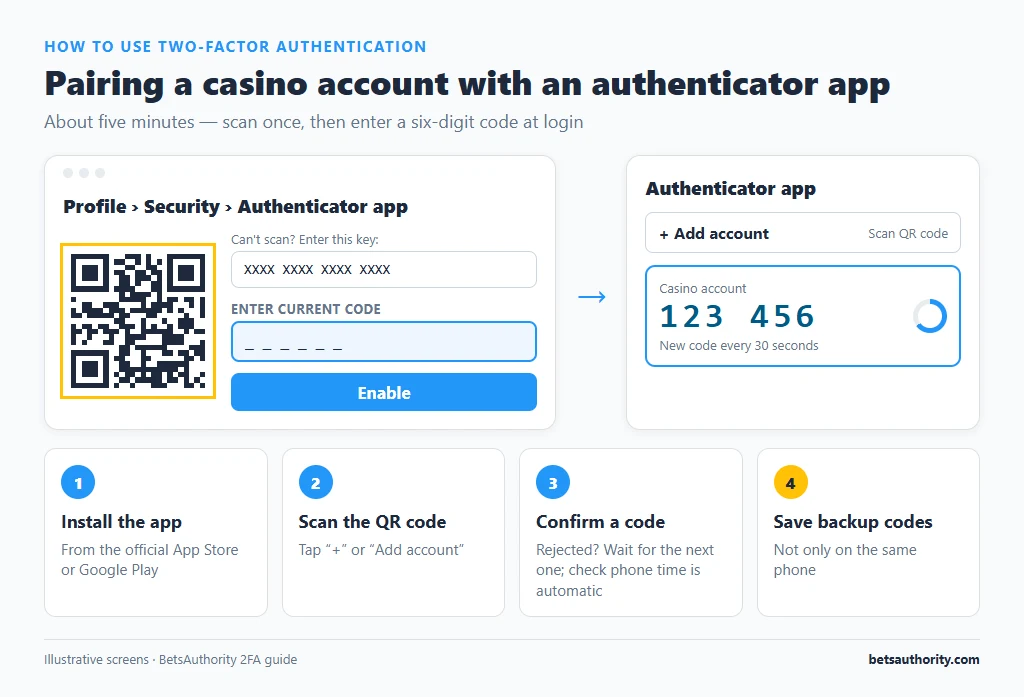
- Install an authenticator app on your phone from the official App Store or Google Play.
- Log in to the casino on a computer or second device and open Profile, then Security (sometimes called “Two-step verification”).
- Choose “Authenticator app” and click Enable. A QR code appears, along with a text key for manual entry.
- Scan the QR code with the authenticator app (tap “+” or “Add account”). The app adds an entry labelled with the casino’s name and starts showing six-digit codes.
- Enter the current code on the casino page to confirm. If it is rejected, wait for the next code and try again.
- Save the backup codes. Most casinos show a set of one-time recovery codes. Store them in your password manager or print them; do not keep them only on the same phone.
- Log out and back in to check that the casino now asks for a code.
Setting Up SMS or Email 2FA
If the casino offers only SMS or email codes:
- Open Security in your profile and choose SMS or email verification.
- Confirm your mobile number in +61 format, or your email address.
- Enter the test code sent to you.
- Turn on 2FA for your email account too, since an attacker with your email can reset your casino password.
- Ask your mobile carrier about adding a PIN or extra verification to your account, which makes SIM-swap fraud harder.
Choosing and Backing Up an Authenticator
The main risk with an authenticator app is losing the phone. Before relying on one, check how it handles backup:
- Cloud backup or sync. Google Authenticator can sync codes to your Google account; Microsoft Authenticator offers cloud backup. With this on, codes reappear when you sign in on a new phone.
- Transfer export. Most apps can export accounts to a new phone via a QR code. Do this before resetting or trading in the old device.
- Password manager authenticators store codes in your encrypted vault, available on every device where the vault is unlocked.
Whichever you use, keep the casino’s backup codes as the last-resort option.
Where 2FA Matters Most
- Logins from new devices. Some casinos only ask for codes on unrecognised devices.
- Withdrawals. Many casinos require a fresh code before every withdrawal or change of payout details.
- Changing email, password or payment methods. These are the steps an attacker would take first.
Our account security tips cover other protections, such as unique passwords and phishing checks.
Common Problems and Fixes
Codes from the authenticator app are rejected
The most common cause is a phone clock that is out of sync. TOTP codes depend on accurate time. Set your phone’s date and time to “automatic”. In Google Authenticator on Android, older versions also offered a “time correction for codes” setting.
You got a new phone and the codes are gone
If you moved your authenticator accounts with the app’s transfer or cloud backup feature, they will appear on the new phone. If not, use a backup code to log in, then disable and re-enable 2FA to register the new phone. Without backup codes, contact support; see the next problem.
Lost phone and no backup codes
Contact support from your registered email. Expect identity checks, often a selfie with your ID or a video call, before 2FA is removed. This can take 1 to 5 business days. Our account recovery guide covers the process.
SMS codes do not arrive
Check signal, that the number is saved with +61 and without the leading zero, and that you have not blocked short-code messages. Wait two minutes before requesting again; repeated requests can trigger a temporary lock. Ask support to switch you to email or app codes if SMS keeps failing.
The casino does not offer 2FA at all
Use a unique, long password from a password manager, and secure your email account with 2FA. Consider this a weakness when comparing casinos; our casino checklist includes account security.
Someone else requested a code you did not ask for
Change your casino password and email password immediately, check your account for withdrawals or changed payout details, and contact support. An unexpected code means someone has your password.
More walkthroughs: how to verify your account, how to contact support and the full list of how-to guides.
Frequently Asked Questions
It is much better than a password alone, but authenticator apps are safer because SMS codes can be intercepted through SIM-swap fraud.
Any standard TOTP app works, including Google Authenticator, Microsoft Authenticator or a password manager’s built-in authenticator. Choose one that offers backup or transfer to a new phone.
They are one-time codes that let you log in when your phone is unavailable. Store them somewhere other than the phone that generates your codes.
It adds a few seconds to enter a code. It does not affect the casino’s processing time.
No. Codes are generated on your phone. Support will never need to ask for a current code; anyone who does is attempting fraud.
Adults 18+ only. For free, confidential help, call Gambling Help Online on 1800 858 858.