
How to Recover a Casino Account
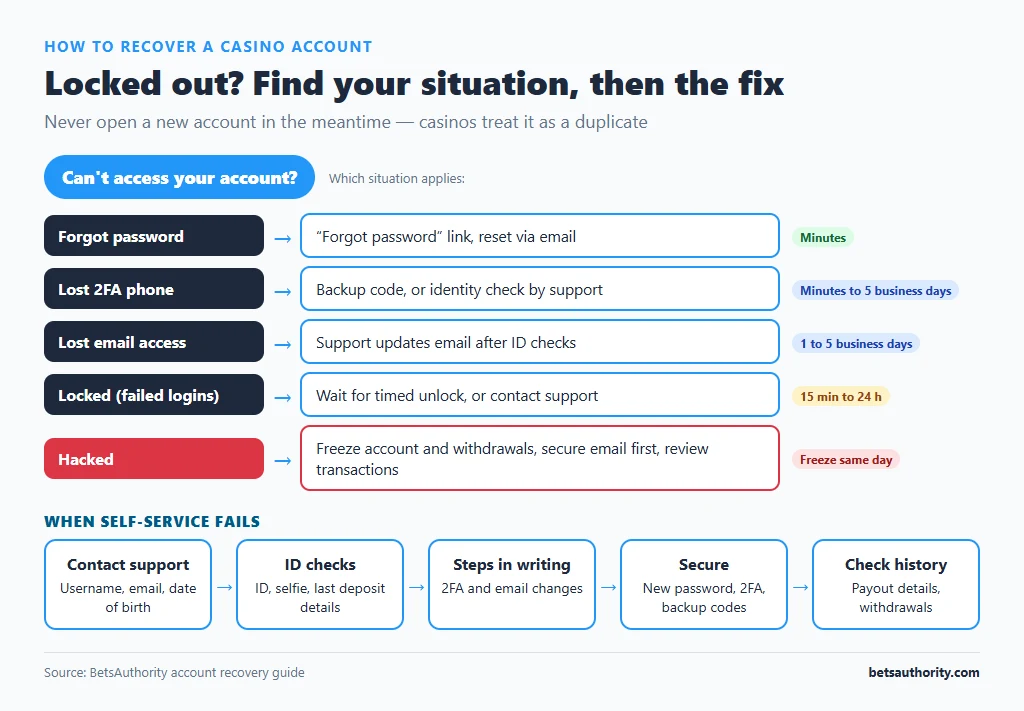
Casino account access problems fall into five situations: a forgotten password, a lost two-factor device, an email address you no longer control, an account locked by the casino, and an account taken over by someone else. Each has a different fix. Self-service resets take minutes; anything needing identity checks typically takes 1 to 5 business days. Never open a new account in the meantime: casinos treat that as a duplicate account, which can lead to both being closed.
Which Situation Are You In?
| Situation | Typical fix | Time |
|---|---|---|
| Forgot password | “Forgot password” link, reset via email | Minutes |
| Lost phone with 2FA | Backup code, or identity check by support | Minutes to 5 business days |
| No access to registered email | Support updates email after ID checks | 1 to 5 business days |
| Locked after failed logins | Wait for timed unlock, or contact support | 15 minutes to 24 hours |
| Suspended or blocked by casino | Support or compliance review; documents often needed | Days to weeks |
| Hacked account | Freeze account, reset access, review transactions | Freeze same day; investigation longer |
Step-by-Step: Resetting a Forgotten Password
- Open the casino’s login page by typing its address, not from an email link.
- Click “Forgot password” and enter your registered email.
- Open the reset email within its time limit, often 15 to 60 minutes. Check spam and promotions folders.
- Set a new unique password of at least 12 characters, ideally generated by a password manager.
- Log in and check your account. Confirm the balance, payout details and recent transactions look right.
Step-by-Step: Recovering When Self-Service Fails
- Contact support through live chat or the email on the casino’s site. Say which situation applies and give your username, registered email, date of birth and approximate registration date.
- Expect identity checks. Support usually asks for your ID, a selfie holding the ID, and sometimes details of your last deposit (amount, date, method). Have them ready; see how to verify your account.
- Ask for the steps in writing, including what will happen to 2FA and your registered email.
- Once access is restored, secure the account. New password, new 2FA, fresh backup codes. Follow how to use two-factor authentication.
- Check payment details and history. Look for changed payout details, new payment methods or withdrawals you did not request.
If You Think the Account Was Hacked
- Ask support to freeze the account immediately, including withdrawals. Use live chat for speed and follow up by email.
- Secure your email first. Change its password and turn on 2FA, because an attacker with your email can reset everything else.
- Change the casino password once you regain access, and do the same on any site where you reused it.
- Report unauthorised transactions. Tell the casino which deposits or withdrawals were not yours. If your card or bank account was used, contact your bank straight away.
- Check your device for malware if you did not reuse your password anywhere, especially if you installed a casino APK or browser extension recently.
- Report scams to Scamwatch at scamwatch.gov.au if you were tricked into giving away details, and consider contacting IDCARE, Australia’s identity support service, if ID documents were exposed.
Prevention Checklist
- Unique password for every casino, stored in a password manager.
- 2FA with an authenticator app, and backup codes stored separately.
- Keep your registered email and mobile number current in your profile.
- Never share login details or codes, including with “support” contacting you through social media.
Our account security tips explain phishing and SIM-swap risks in more detail.
Common Problems and Fixes
The password reset email never arrives
Check spam, wait 10 minutes and request once more. Make sure you are using the email you registered with; try other addresses you own. If still nothing, ask support to confirm which email is on file (they will usually only give a partial address).
Support says the account is “under review” with no reason
This often relates to verification, bonus terms or payment checks. Ask which department is reviewing it, what documents are needed and the expected timeframe. Our contact support guide has templates for this.
The account was closed for “duplicate accounts”
If you opened a second account because you could not access the first, explain this to support and provide evidence of both. Ask for one account to be reinstated and the other closed. Outcomes vary by casino.
You self-excluded and now want access
Self-exclusion is designed not to be reversible during its term at reputable casinos. If you are trying to get around it, consider talking to Gambling Help Online; our self-exclusion guide explains why.
The casino will not respond at all
Keep records, verify the casino’s licence using how to check a casino licence, and follow how to file a complaint.
More walkthroughs are in the how-to guides.
Frequently Asked Questions
A password reset takes minutes. Recovery that needs identity checks, such as a lost 2FA phone or changed email, typically takes 1 to 5 business days.
No. Casinos generally allow one account per person, and a second account can lead to both being closed and winnings voided. Recover the original account instead.
The balance stays in the account. If you suspect a hack, ask support to freeze withdrawals until you regain access.
Usually your registered email, date of birth, ID document, a selfie with the ID and details of a recent deposit.
Contact the casino immediately to freeze the account, report the withdrawal, and contact your bank if your payment details were used.
Adults 18+ only. Free support is available from Gambling Help Online on 1800 858 858.