
How to Verify Your Casino Account (KYC)
Verification, usually called KYC (“know your customer”), is the step where a casino confirms that you are who you say you are, that you are over 18 and that the payment method belongs to you. Licensed operators are required to do it under anti-money-laundering rules, and most will not release a withdrawal until it is complete. Done properly, it takes 15 minutes of your time and usually 24 to 72 hours of the casino’s. Done badly, it is the single biggest cause of delayed payouts.
This guide covers the practical steps. For background on why casinos check documents and which thresholds trigger extra checks, see our KYC verification explainer.
Documents You Will Usually Need
| Check | Accepted documents (typical) | Common requirement |
|---|---|---|
| Identity | Passport, Australian driver licence (front and back), proof-of-age card | Valid, not expired, all four corners visible |
| Address | Utility bill, bank statement, council rates notice, phone or internet bill | Issued within the last 3 months, shows your name and full address |
| Payment method | Photo of card (middle 8 digits covered), bank statement screenshot, e-wallet profile screenshot, crypto exchange account page | Name on the method matches the account name |
| Selfie or liveness | Photo holding your ID, or a short video check via an app | Face and ID both clearly readable |
| Source of funds (large amounts) | Payslips, tax return, bank statements | Requested only above certain deposit or withdrawal levels |
Mobile phone bills and bank statements are the most reliable proof of address because they are dated and show the full name. Screenshots of an online banking app are accepted by many casinos, but a downloaded PDF statement is accepted almost everywhere.
Step-by-Step: Completing Verification
- Check your profile details first. Open your account settings and make sure your name, date of birth and address match your documents character for character, including unit numbers and street abbreviations. Ask support to fix any mismatch before uploading.
- Find the verification section. It is usually under Profile, “My Account”, “Verification” or “Documents”. Some casinos only show it after your first deposit or when you request a withdrawal.
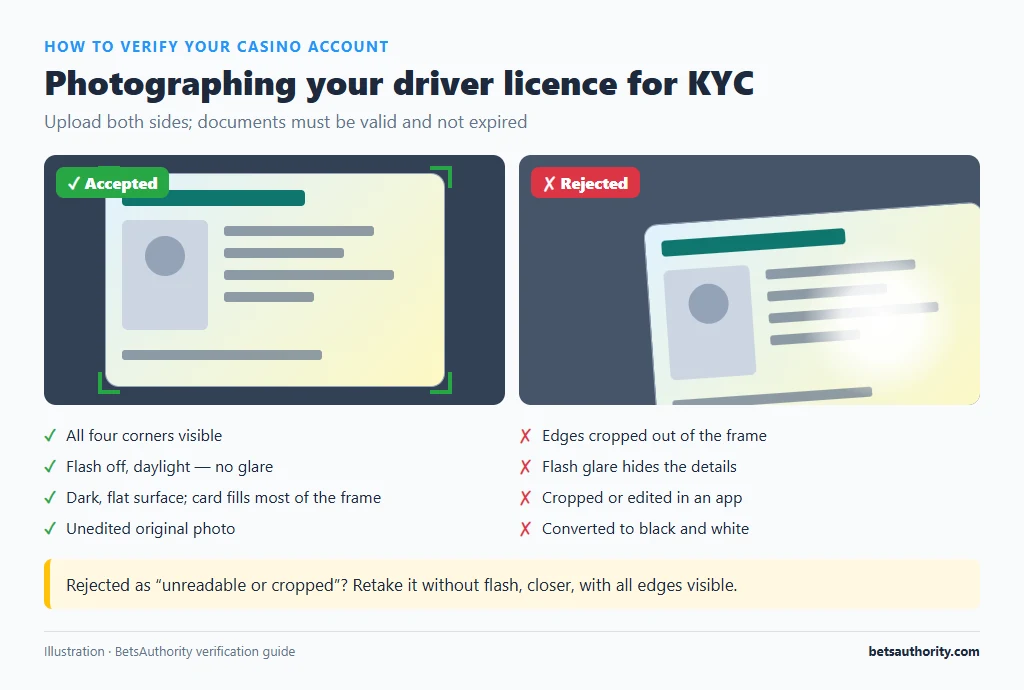
- Photograph your ID properly. Place it on a dark, flat surface in daylight, turn off the flash to avoid glare, and fill most of the frame while keeping all four corners in shot. For a driver licence, upload both sides.
- Prepare your proof of address. Download the PDF from your provider rather than photographing a screen. If the casino needs an image, take a clear screenshot of the whole first page, including the date and logo.
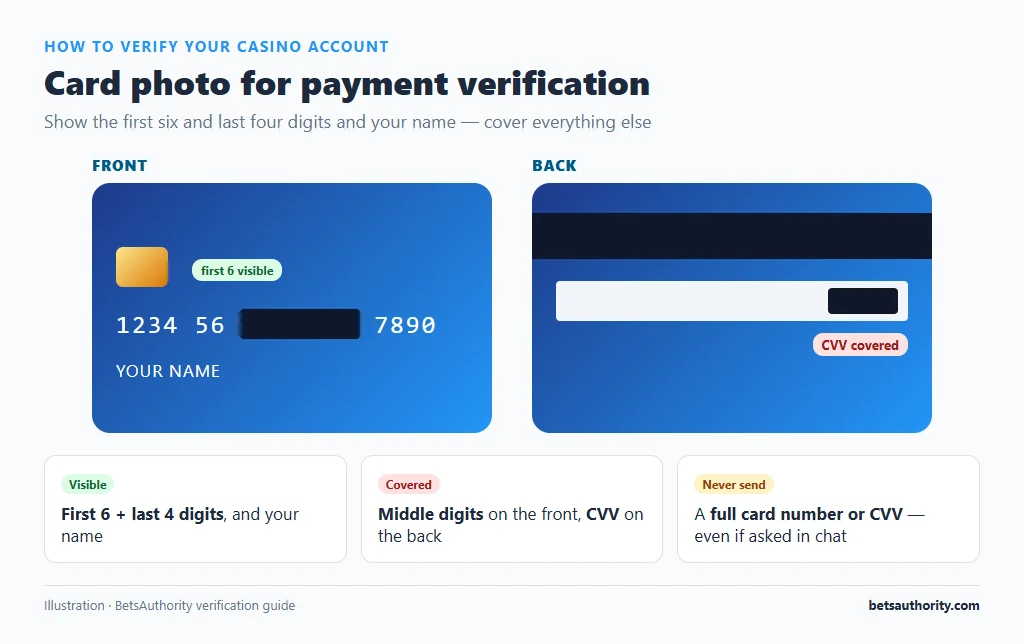
- Cover sensitive numbers on card photos. Show the first six and last four digits and your name; cover the middle digits and the CVV on the back. Never send a full card number or CVV, even if asked in chat.
- Upload, then confirm by chat. After uploading, message live chat to say the documents are in. On many sites this moves you into the review queue faster.
- Complete any selfie or liveness step on your phone. If the casino uses a third-party verification app or link, follow it within the time limit (often 15 to 30 minutes) and use good light.
How Long Verification Takes
Automated checks can approve you in minutes. Manual reviews typically take 24 to 72 hours, longer over weekends or when the casino is processing a backlog. If nothing has happened after three business days, follow up politely with your account ID and the date you uploaded. When you are verifying in order to cash out, read our guide to withdrawing winnings so the next step goes smoothly.
Common Problems and Fixes
“Document rejected: unreadable or cropped”
Retake the photo without flash, closer, and with all edges visible. Do not upload scans that have been edited, cropped in an app or converted to black and white; automated systems often flag edits as possible tampering.
Proof of address rejected because it is “too old” or “not accepted”
Use a document dated within the last three months that is posted or emailed to you by an organisation (bank, utility, telco, council). Mobile screenshots of bank apps and letters from friends or employers are frequently refused. If you recently moved, a bank statement showing the new address is the quickest fix.
Name on your bank account or card does not match
Joint accounts and cards in a partner’s name are common reasons for rejection. Casinos generally only pay out to a method in the account holder’s name. Use your own card, bank account or wallet, or ask support which alternative they accept.
Verification is “pending” for days
Check your email (including spam) for a request for extra documents. Then contact support with your account ID, which documents you uploaded and when. If the casino keeps asking for new documents after each upload without explaining why, that is a warning sign; our page on spotting a scam casino describes this pattern.
The casino asks for source-of-funds documents
This is normal after large deposits or withdrawals. Provide a recent payslip or bank statement showing regular income. You can black out unrelated transactions, but keep your name, the bank name and the period visible.
Uploads fail or the page freezes
Files are often limited to 5 to 10 MB and formats such as JPG, PNG or PDF. Compress large phone photos, try a different browser, or email the documents to the casino’s official support address listed on its website.
Privacy and Security Tips
- Upload only through the casino’s verification page or its official support email, never through links received by SMS or social media.
- Covering the middle card digits is acceptable to legitimate casinos. Full card numbers are never required.
- Keep a list of which casinos hold your documents. If you stop playing, request account closure; our guide on closing a casino account covers how to ask about data deletion.
- Read our account security tips and switch on two-factor authentication once you are verified.
For more step-by-step walkthroughs, return to the casino how-to guides. If you have just registered, our guide on registering at an online casino explains how to fill in details so KYC passes first time.
Frequently Asked Questions
Usually not. Most casinos let you deposit and play first, then require verification before the first withdrawal. Verifying early avoids waiting at the point you want your money.
It is a normal requirement, but the risk depends on the operator. Use casinos with a verifiable licence, upload only through official channels and cover the middle digits of cards.
Some casinos accept it as a secondary document, but most require photo ID such as a passport or driver licence for the main identity check.
Casinos can request further checks at any time, often after a large win, a new payment method or a change of address. Provide the requested documents promptly and ask support exactly which item is outstanding.
You can usually keep playing, but withdrawals will be held. Some casinos also suspend unverified accounts after a set period or once deposits pass a threshold.
Gambling is for adults 18+ only. Free, confidential support is available from Gambling Help Online on 1800 858 858.