
How to Install a Casino App or PWA
Offshore online casinos are generally not available as apps in the Australian App Store or Google Play, because both stores restrict real-money gambling apps to operators licensed in the user’s country. What these casinos offer instead is usually one of two things: a progressive web app (PWA), which is the casino website saved to your home screen and opened full-screen, or an Android APK file downloaded directly from the casino. A PWA needs no special permissions; an APK does, and carries more risk.
For whether you need an app at all, see how to play on mobile and our mobile casinos guide.
PWA vs APK vs Store App
| Type | How you install | Permissions needed | Updates | Risk level |
|---|---|---|---|---|
| PWA / home-screen web app | Browser menu, “Add to Home Screen” or “Install app” | None beyond the browser | Automatic (it is the website) | Low |
| Android APK from casino site | Download file, allow “install unknown apps” | Unknown-sources permission for your browser | Manual or in-app | Higher: no store review |
| App Store / Google Play app | Store download | Standard | Store-managed | Low, but generally not offered for offshore casinos in Australia |
Step-by-Step: Installing on iPhone or iPad (Safari)
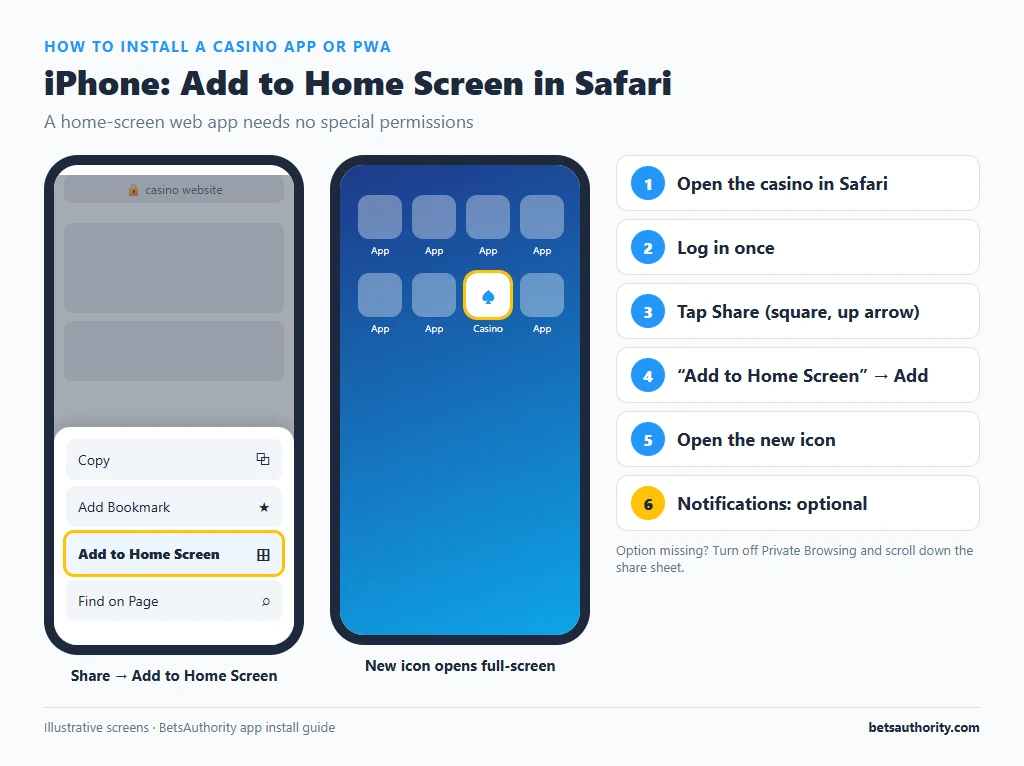
- Open the casino in Safari (on recent iOS versions, some other browsers also support adding web apps to the Home Screen).
- Log in once so the session is saved.
- Tap the Share button (the square with an upward arrow).
- Scroll and tap “Add to Home Screen”. Edit the name if you like, then tap Add.
- Open the new icon. If the casino supports PWA mode, it opens full-screen without Safari’s address bar.
- Allow notifications only if you want them. Home Screen web apps on iOS 16.4 and later can request push notifications. Declining is fine and reduces prompts to play.
Step-by-Step: Installing on Android (Chrome)
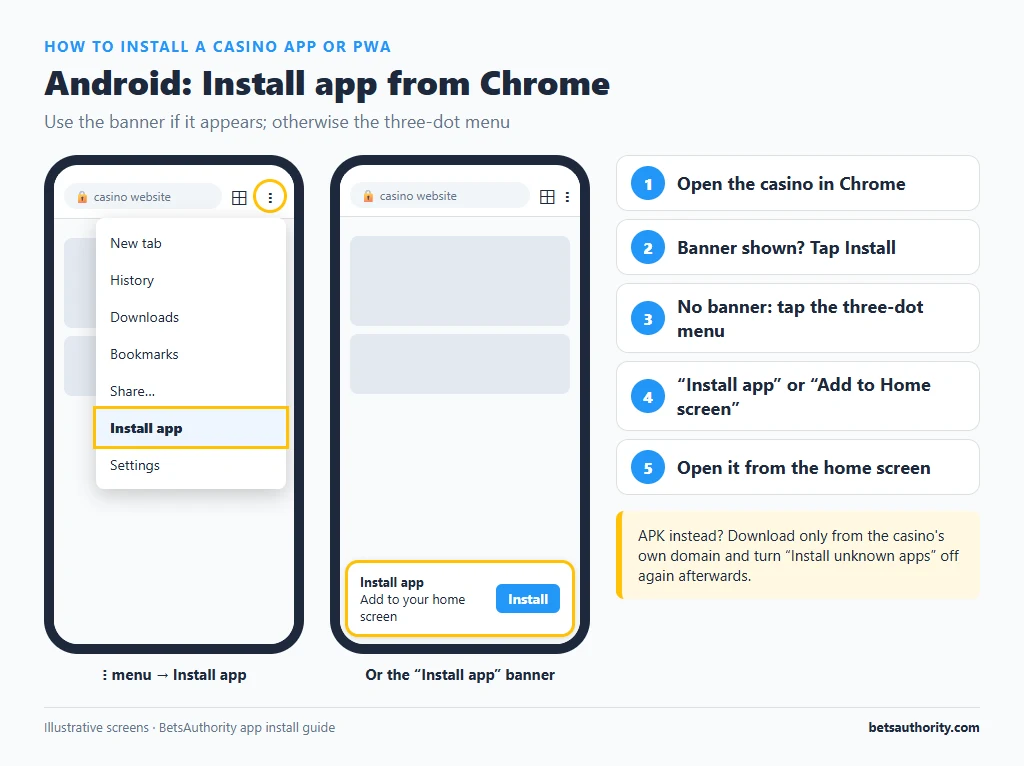
- Open the casino in Chrome.
- Look for an “Install app” banner at the bottom of the screen. If it appears, tap Install.
- If there is no banner, tap the three-dot menu in the top right.
- Choose “Install app” or “Add to Home screen”. Confirm.
- Open the icon from your home screen or app drawer. A full PWA appears in the app list; a simple shortcut appears only on the home screen.
If the Casino Offers an APK Download
Some casinos link to an Android APK instead of, or as well as, a PWA. Before installing:
- Download only from the casino’s own domain, reached by typing the address yourself. APKs shared on forums or messaging apps can contain malware.
- Android will ask you to allow “Install unknown apps” for your browser. Grant it for this install only.
- Install, then turn the permission off again in Settings, Apps, your browser, “Install unknown apps”.
- Check the app’s permissions. A casino app has no reason to need your contacts, SMS or accessibility services. Uninstall any that asks.
- Keep Google Play Protect switched on so the APK is scanned.
In most cases the PWA offers the same games and cashier, without these risks.
Common Problems and Fixes
The icon opens a normal browser tab, not an app
The casino has not set up full PWA support, so your phone created a bookmark shortcut. It works the same way; only the address bar remains visible.
“Add to Home Screen” is missing on iPhone
Make sure you are not in Private Browsing, and scroll down in the share sheet; you can also edit the action list to add it. On older iOS versions, only Safari offers the option.
No “Install app” option on Android
Update Chrome. Some sites only trigger the install prompt after you have visited a few times; the “Add to Home screen” option in the menu always works as a fallback.
“App not installed” error for an APK
Common causes are insufficient storage, an older Android version, or a conflict with a previous version. Uninstall the old version and retry, or use the PWA instead.
The home-screen app logs you out every time
PWAs on iOS keep storage separate from Safari, so you may need to log in once inside the app. If it still logs out, check that the device is not clearing website data automatically.
You want to remove the app
Press and hold the icon and choose Remove or Uninstall. This deletes the shortcut and local data but not your casino account; to close the account, see how to close a casino account.
For safer logins inside the app, set up two-factor authentication and read our account security tips. All walkthroughs are listed in the how-to guides, and app-friendly sites appear in our mobile casino list.
Frequently Asked Questions
Store policies generally only allow real-money gambling apps from operators licensed in the user’s country. Offshore casinos are not licensed in Australia, so they use web apps or APKs instead.
A PWA is the casino’s website in an app-style window, so it is as safe as using the site in your browser. It needs no extra permissions.
They carry more risk because they bypass store review. Only install from the casino’s official site, grant permissions minimally, and keep Play Protect on.
A PWA uses about the same data as the browser because it loads the same site. A native app may cache more assets, but game streams and live dealer video still dominate data use.
Yes. The app uses the same account, so promotions, balances and limits are identical to the website.
Adults 18+ only. Gambling Help Online is available 24/7 on 1800 858 858.