
How to Deposit at a Casino with PayID
PayID is an identifier (mobile number, email, ABN or Organisation ID) linked to a bank account and used for fast payments over Australia’s New Payments Platform (NPP). When both banks support it, a PayID payment usually arrives in under a minute, 24/7. At offshore casinos, PayID deposits are normally processed through a third-party payment provider, so the payee name you see in your banking app is often not the casino’s name. That one detail causes most of the confusion covered below.
For limits, fees and which banks support PayID, see our PayID payment guide. This page covers the deposit itself.
What You Need
- An Australian bank account with online or app banking that supports PayID/Osko payments (all major banks and most credit unions do).
- A verified or at least registered casino account with A$ as the account currency.
- Enough daily transfer limit. Banks set their own PayID limits, and a new payee can trigger a lower limit or a temporary hold.
How a Casino PayID Deposit Works
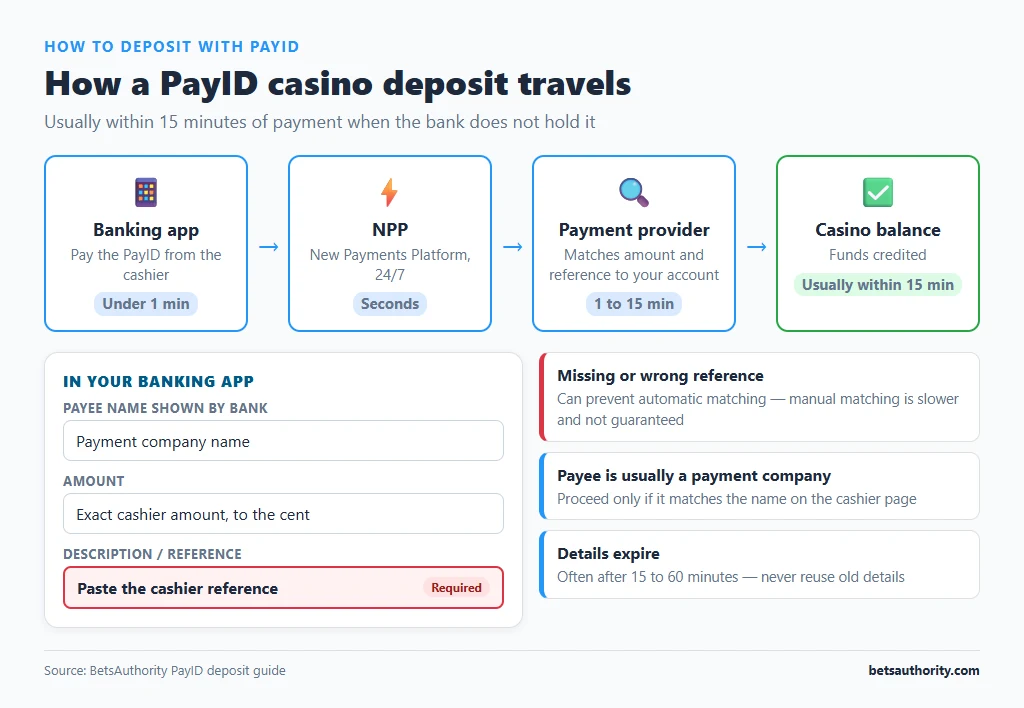
| Stage | What happens | Typical time |
|---|---|---|
| Request | Casino cashier generates payment details: a PayID (usually an email) and often a unique reference | Instant |
| Payment | You pay that PayID from your banking app | Under 1 minute if not held |
| Matching | The payment provider matches your amount and reference to your casino account | 1 to 15 minutes |
| Credit | Funds appear in your casino balance | Usually within 15 minutes of payment |
Step-by-Step: Depositing with PayID
- Log in and open Cashier, then Deposit, then PayID. Some casinos list it as “PayID / Osko” or under “Bank transfer”.
- Enter the deposit amount in A$. Check the minimum (often A$20 to A$30) and maximum per transaction. If you want a bonus, activate it now, before payment details are generated.
- Copy the PayID and reference exactly. The casino shows a PayID (for example an email address) and, in most cases, a unique reference or description code. Copy both with the copy buttons. Many casinos create a new PayID or reference for every deposit, so do not reuse old details.
- Note the time limit. Payment details often expire after 15 to 60 minutes. Pay within that window.
- Open your banking app and choose Pay, then PayID. Paste the PayID. Your bank shows the registered name of the account holder before you confirm.
- Check the payee name against what the cashier told you. The name is usually a payment company, not the casino. Proceed only if it matches the name shown on the cashier page. If the cashier showed no name and the payee looks unrelated, stop and ask live chat first.
- Enter the exact amount and paste the reference into the description field. Send the amount you entered in the cashier, to the cent. A different amount or a missing reference can prevent automatic matching.
- Confirm the payment and return to the casino. Leave the cashier page open if it shows a status timer. Screenshot the bank receipt, which shows the date, time, amount and payee.
Why PayID Is Popular for Casino Deposits
- Speed: NPP payments clear in seconds when not held for review, so deposits usually reach the balance within minutes.
- No card details shared: you never enter card numbers at the casino.
- Fees: banks generally do not charge for PayID payments. Some casinos or their providers add a processing fee; it will appear in the cashier before you confirm. Our deposit fees guide explains the usual charges.
- Withdrawals are a separate question. Not every casino that accepts PayID deposits pays out by PayID. Check the withdrawal methods first; our guide on withdrawing to a bank account explains the alternatives.
Common Problems and Fixes
Your bank put the payment on hold
Banks may hold a first payment to a new PayID or flag payments to payment providers associated with gambling. Some hold first-time payments for up to 24 hours. Check your banking app messages and, if asked, confirm the payment by phone or in-app. Do not resend the payment while the first one is on hold or you may pay twice.
The money left your bank but the casino balance has not changed
Wait 15 minutes, then contact casino support with the receipt screenshot, the amount, time and reference used. Manual matching usually resolves it within a few hours. If the payment details had expired before you paid, the provider normally has to match or refund manually, which can take several business days.
You forgot the reference
Send support the bank receipt immediately. Most providers can match by amount, time and payer name, but it is slower and not guaranteed. If the casino cannot credit the payment, ask for a refund to the original account in writing.
The bank shows a different payee name to the one in the cashier
Cancel the payment and contact live chat. Mismatched names can mean the details have expired, been reassigned, or that you are on a fake copy of the casino site. Our guide to spotting a scam casino lists other warning signs.
Your bank blocked gambling transactions
Some Australian banks offer a gambling block on cards and may extend it to transfers to known gambling merchants. If you turned this on yourself, treat it as a signal to pause rather than to find a workaround; our setting limits guide explains why these tools are designed to be hard to reverse.
The daily limit is too low
PayID payments count towards your bank’s daily transfer limit. You can usually change it in your app’s security settings, sometimes with a waiting period. Set a casino deposit limit at the same time so a higher bank limit does not become higher spending.
Casinos that accept PayID are compared on our PayID casinos page. For other options, see how to deposit with crypto, and for faster cash-outs read our guide to fast withdrawals. All walkthroughs are listed in the how-to guides.
Frequently Asked Questions
No. You only need a PayID registered to receive payments. To send to the casino’s PayID, you just need online banking that supports PayID payments.
Offshore casinos usually take PayID deposits through a payment processor, so the account belongs to that company. Always check that the name matches what the cashier shows before sending.
Usually a few minutes from payment to balance. Bank holds on new payees, missing references or expired payment details can stretch this to a day or more.
Most Australian banks do not charge for PayID payments. A casino or its provider may add a fee, which should be shown in the cashier before you pay.
NPP payments cannot be reversed like card payments. If a deposit is not credited, the casino or provider must agree to refund it, so keep your receipt and contact support promptly.
Adults 18+ only. If gambling is causing harm, call Gambling Help Online on 1800 858 858.