
How to Close an Online Casino Account
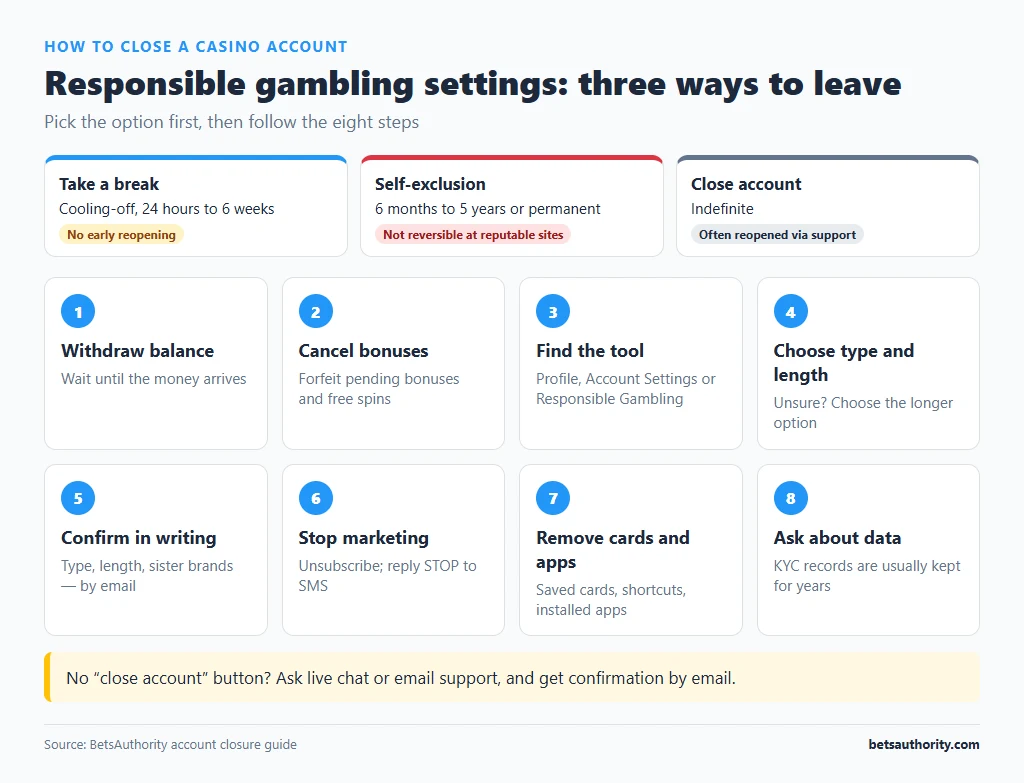
Casinos offer several ways to leave, and they are not the same. A simple account closure can often be reversed by emailing support. A cooling-off period blocks access for a set time, typically 24 hours to 6 weeks. Self-exclusion blocks access for months or years and, at reputable operators, cannot be undone early. Choosing the right option is the main decision; the steps are short.
If you are closing an account because gambling is causing problems, self-exclusion is the stronger tool. Our guides to self-exclusion and cooling-off periods explain how each works.
Closure Options Compared
| Option | Typical length | Can you reopen early? | Use it when |
|---|---|---|---|
| Account closure | Indefinite | Usually yes, by contacting support | You no longer want to use this casino |
| Cooling-off / time-out | 24 hours to 6 weeks | No, until the period ends | You want a short, enforced break |
| Self-exclusion | 6 months to 5 years or permanent | No, at reputable operators | You want to stop gambling at this casino |
Exact options and durations depend on the casino and its licence. Some casinos apply self-exclusion across all sister brands run by the same company; ask support to confirm.
Step-by-Step: Closing Your Account
- Withdraw your balance first. Closing or self-excluding does not automatically pay out your balance, and some casinos apply dormancy or closure rules to leftover funds. Follow how to withdraw to a bank or how to withdraw crypto, and wait until the money has arrived.
- Cancel pending bonuses and free spins. Active promotions can complicate closure; forfeiting them first avoids disputes.
- Look for the closure tool. Check Profile, Account Settings, or the Responsible Gambling section for “Close account”, “Take a break” or “Self-exclude”. Many casinos have no self-service button and require you to contact support.
- Choose the type and length. Pick closure, cooling-off or self-exclusion, and the period. If you are unsure, choose the longer option; a short block is easy to wait out, and a long one cannot be shortened at reputable sites.
- Confirm in writing. If you use live chat, ask the agent to confirm by email that the account is closed, the type of closure, its length and whether it covers sister brands. Save that email.
- Unsubscribe from marketing. Use the unsubscribe link in casino emails and reply STOP to SMS offers. Ask support to remove you from all marketing lists. Self-excluded players should not receive promotions at all; if they keep arriving, report it.
- Remove saved payment methods and delete apps. Remove the casino’s shortcut or installed app from your phone, and delete saved cards from your browser.
- Request data deletion if you want it. Ask what personal data will be kept and for how long. Casinos usually must retain KYC and transaction records for several years under anti-money-laundering rules, but you can ask for marketing data to be removed.
Wider Blocks for Australians
Closing one account does not stop you from opening another elsewhere. For broader protection:
- BetStop, the National Self-Exclusion Register, blocks you from all licensed Australian online and phone wagering providers in one step. According to betstop.gov.au, it does not cover online casinos, which are not licensed in Australia. See our BetStop guide.
- Blocking software stops gambling sites loading on your devices. Our guide to gambling blocking software compares the options.
- Bank gambling blocks offered by most major Australian banks can stop card payments to gambling merchants.
Common Problems and Fixes
There is no “close account” button
Contact live chat or email support and write: “Please permanently close my account [username/ID]. Confirm by email that the account is closed and that I will receive no further marketing.” Our contact support guide covers which channel gets the fastest response.
Support tries to talk you out of it or offers a bonus
Repeat your request clearly and decline offers. A casino that keeps sending promotions after a closure request is ignoring its own responsible gambling policy; keep screenshots, which are useful if you later file a complaint.
The account was reopened by logging in
Simple closures at some casinos are reversed by logging in or contacting support. If that is a risk for you, ask for self-exclusion instead, which should not be reversible.
Money is left in a closed account
Contact support with your account ID and ask for the balance to be paid to your verified method. Casinos usually require KYC to be complete before paying out a closed account.
You still get emails after self-excluding
Forward them to support, quoting the date of your exclusion, and ask for removal within 24 hours. Persistent marketing to a self-excluded customer can be reported to the casino’s licensing authority.
For more walkthroughs, see the how-to guides, including how to set deposit limits if you prefer to keep an account with tighter controls.
Frequently Asked Questions
Closure ends your use of the account but can usually be reversed. Self-exclusion is a commitment for a fixed period during which the casino must refuse to reopen the account or accept your bets.
Not entirely. Casinos keep identity and transaction records for a period required by anti-money-laundering rules. You can ask for marketing data to be deleted and for the retention period to be confirmed.
Not always. Ask support whether closure or self-exclusion applies to every brand run by the same operator, and close each one separately if not.
No. BetStop covers licensed Australian online and phone wagering providers. Online casinos are not licensed in Australia, so you need to self-exclude with each casino and consider blocking software.
It stays in the account unless you withdraw it. Withdraw before closing, and if funds remain, ask support in writing to pay them to your verified method.
If you want support with stopping gambling, Gambling Help Online is free, confidential and available 24/7 on 1800 858 858. Adults 18+ only.